
A customer asks about your services after office hours. Another submits an enquiry but leaves out important details. Your sales team spends the next morning answering familiar questions, checking information, and copying conversations into the CRM.
These problems all look like opportunities for automation. But they do not necessarily need the same solution.
Understanding agentic AI vs chatbots helps you decide when your business needs a conversation, when a predefined workflow is enough, and when an AI agent can help manage a more varied task.
For businesses connecting digital marketing, customer enquiries, and CRM systems, this choice matters. The right approach can reduce delays and repetitive work. The wrong approach can add complexity without improving the customer experience.
Three Approaches, Three Different Jobs
A chatbot handles conversations. It can answer questions, explain services, and collect information. Some chatbots follow scripts, while others use AI to understand natural language and find answers in approved business content.
A predefined automation follows an established process. When a particular event occurs, it performs specified actions. A website enquiry might create a CRM record, assign a salesperson, and trigger a reminder. These workflows can include AI for specific steps while keeping the overall process fixed.
An AI agent can choose its next step within defined boundaries. It might review an enquiry, identify missing information, consult an approved source, and use connected tools to complete a task. Its route can change depending on what it finds.
Anthropic makes a similar distinction: workflows follow predefined paths, while agents dynamically direct their processes and tool use. It recommends starting with the simplest approach that meets the need, since agentic systems can introduce additional cost, delay, and opportunities for error.
These categories can overlap. A chatbot can be the conversational interface for an agent, and a fixed automation can connect both to your CRM. A chat window alone tells you very little about what happens behind it.
| Decision area | Chatbot | Predefined automation | AI agent |
|---|---|---|---|
| Main purpose | Answer questions and collect information | Complete a repeatable process | Handle tasks where the next step varies |
| How it works | Uses scripted or AI-powered conversation | Follows set triggers, rules, and steps | Chooses actions based on context and results |
| Best suited for | FAQs, service guidance, initial enquiries | Lead routing, reminders, standard CRM updates | Contextual enquiry qualification and varied service requests |
| System access | Approved content and connected tools | Integrations configured for each step | Explicitly permitted tools and records |
| Main limitation | May misunderstand questions or give unsupported answers | Cannot handle unplanned situations without an exception route | May make incorrect decisions or take unnecessary steps |
| Human approval | Required for sensitive disclosures or consequential actions | Built into specified approval points | Required for actions beyond its authority |
| Human handoff | Transfers unanswered or sensitive questions | Routes failures and exceptions to a person | Escalates ambiguity, blocked actions, and policy exceptions |
System access depends on the design, not the label. A chatbot can update a CRM if connected and authorised. An AI agent cannot access customer records simply because it is called an agent.
What This Looks Like in Everyday Business
The following scenarios are illustrative. They show how a business might choose an approach rather than describe results from a particular client.
Answering FAQs for a Retail Business
A furniture retailer receives frequent questions about delivery areas, store hours, materials, and product care.
A chatbot connected to approved information is a sensible starting point. Customers get answers without waiting for someone to reply to every routine message.
If a customer asks for the status of a specific delivery, the system needs identity checks and access to order information. A fixed lookup process may still be enough. There is little reason to introduce an agent if the task is simply to retrieve a delivery date.
A human should take over when the information is unavailable, the customer disputes it, or the request involves a special commitment.
Qualifying an Enquiry for a Real Estate Business
A prospective buyer writes, “I need a two bedroom apartment near an MRT station, but I am still deciding my budget.”
A scripted chatbot can ask standard questions about location, budget, and timing. A predefined automation can then assign the enquiry using agreed rules.
An AI agent becomes useful when enquiries vary considerably. It can recognise information already provided, ask relevant follow up questions, and consult approved listings before preparing a summary for the sales team.
The boundary should remain clear. It can organise stated preferences and suggest relevant options, while a person confirms availability, negotiates terms, and makes commitments.
Updating a CRM for a Professional Services Firm
A consulting firm receives leads through advertising, website forms, and email.
For a structured form, predefined automation can check required fields, search for an existing contact, and create or update the CRM record. This is often simpler than asking an agent to decide how to process every submission.
For a long email describing several needs, AI can help extract the requirements. An agent may be useful if it must consult previous correspondence and decide what additional information to request.
Before any update, the system should verify the correct customer record. Uncertain information should be flagged for review rather than silently replacing confirmed details.
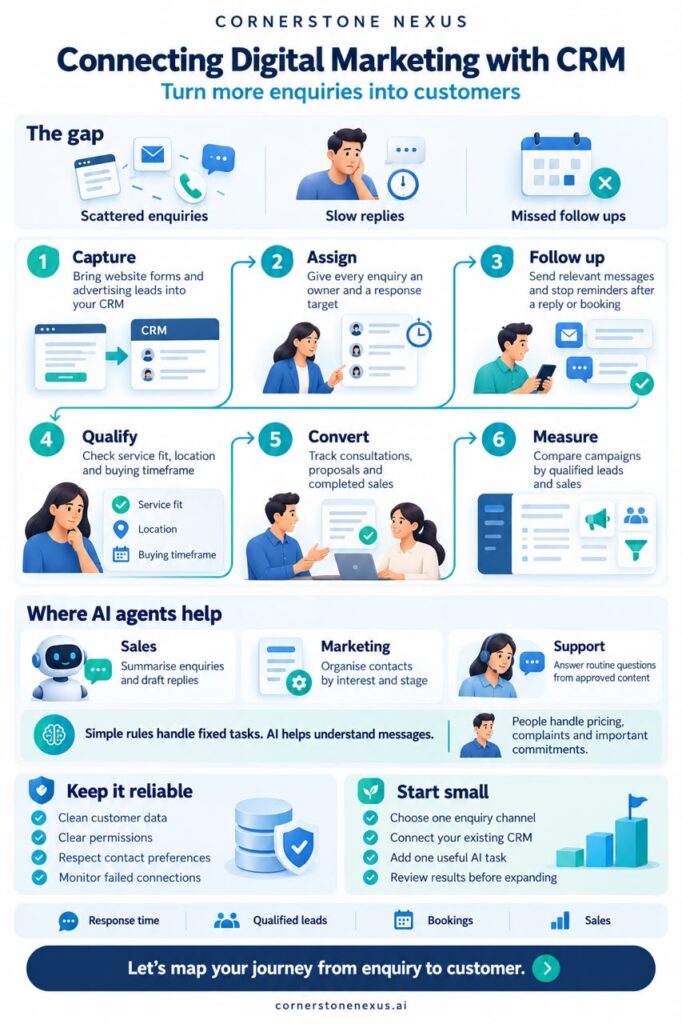
This is where digital marketing and CRM integration becomes valuable: the enquiry arrives with its campaign source and relevant context, helping the team understand both the customer and how they found the business.
Escalating an Exception
A retail customer requests a refund outside the normal policy because an item arrived damaged.
A predefined workflow can flag the request for review. An AI agent may also gather the order details, summarise the complaint, and identify the relevant policy before handing it over.
The agent should not invent an exception or promise a refund beyond its authority.
A useful handoff includes the customer’s request, verified facts, actions already attempted, and the decision needed. The customer should not have to repeat the entire conversation.
What Current AI Trends Mean for Business Owners
The conversation is moving from AI that produces answers to AI that participates in business workflows. However, adoption and measurable value are different things.
McKinsey’s August 2026 global survey found that 80% of respondents reported improvements in their individual productivity from AI, while 37% reported a positive contribution to their organisation’s earnings before interest and taxes. About 20% said AI operating costs constrained usage. These figures cover AI broadly, rather than proving that agents outperform chatbots.
For a business owner, the implication is practical: measure whether the workflow improves, rather than counting how many AI features you introduce.
Connected tools are another relevant development. Standards such as the Model Context Protocol help AI systems connect with external tools and information sources. Connections make more workflows possible, but businesses still need to decide which information each system may access and which actions require approval.
A useful starting design combines conversation, fixed rules, and selective agent capabilities. Each handles the part of the process it suits best.
Set Permissions Before Switching It On
Before implementing any solution, define three boundaries: what it can read, what it can change, and what requires a person’s approval.
For example, an enquiry assistant might read approved service information, create a contact record, and add a conversation summary. Changing agreed prices, deleting records, approving refunds, or making contractual commitments would require separate authority.
Enforce these boundaries through system permissions and approval controls. Written instructions alone should not determine what a connected system can change.
Human handoffs also need an owner. Decide who receives exceptions, how quickly they should respond, and what the customer sees while waiting. A transfer to an unattended inbox does not resolve the problem.
A Practical Checklist for Choosing Your First Workflow
Before investing, ask:
- Is the main need an answer? Start with a chatbot using approved information.
- Are the steps predictable? Use predefined automation.
- Does the next step depend on varied context? Consider an AI agent.
- Is the underlying information reliable? Fix outdated policies and inconsistent CRM records first.
- Which actions need approval? Define the limits before connecting systems.
- Who handles exceptions? Assign a person or team.
- How will you measure success? Track response time, accurate updates, completed enquiries, rework, and cost per completed task.
Pilot one workflow and test ordinary requests alongside missing details, duplicate records, failed connections, and unusual customer demands. Expand when the results justify it.
Choose the Approach That Makes Work Easier
You do not need an AI agent for every business problem. You need a process that answers customers clearly, moves information accurately, and brings people in when their judgement matters.
Cornerstone Nexus helps businesses connect intelligent automation, conversational AI, AI agents, CRM integration, and digital marketing around practical operational needs. The starting point is understanding where work slows down and choosing the right level of automation.
“Partnering with Execor team was exactly what we were looking for. They are much more than accountants; they provide guidance and are available to talk through decisions that impact our business.”
John Smith, CEO & Owner Tweet
Results
- Execor’s solutions helped the executive team understand the financial impacts of their operational and sales decisions.
- Salient gained a holistic view of their cash flows and timing of their Series A raise.
- Our capable outsourced accounting and finance team provided confidence and stability to the executive team of a growing company.



I look forward to seeing how these developments will improve service levels and customer satisfaction in the freight industry!